A bounce trade needs three prices decided in advance. Entry inside the zone, stop-loss beyond it, take-profit before the next level, sized so the stop costs no more than 1% of the account.
In this lesson you put the last four lessons together into one trade plan: a limit order at
a support zone, with the stop-loss and take-profit set before price arrives. A limit order waits
for price to come to your level. The practice ticket has no buy limit, so on /practice you do the
same job with an alert plus a market order.
1 Three prices, decided before you trade
A bounce trade bets that price will turn at a level, as it has before. You decide three
prices before price gets there:
Entry: inside the zone. Not in the middle of nowhere, and not after price has already
bounced 50 pips away.
Stop-loss: beyond the zone. If price goes clearly through the level, the reason for
the trade is gone, so get out.
Take-profit: just before the next level. The next resistance is where sellers may
step in, so take profit a little before it.
Then you size the trade so that hitting the stop costs at most 1% of your account
(Module 1).
2 Worked example: EURUSD, April 2026
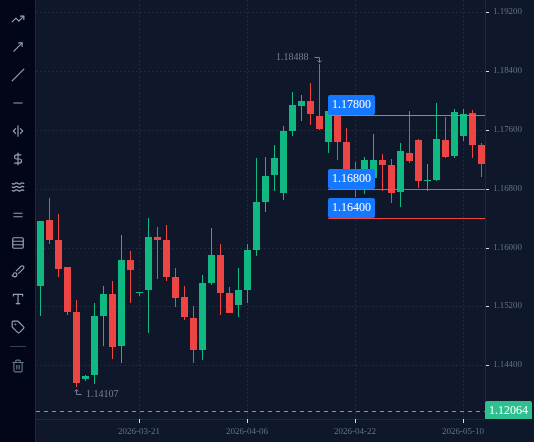
Use the range from lesson 2.2 (EURUSD D1, 20 April to 13 May 2026): support about 1.1655 to
1.1680, resistance about 1.1782 to 1.1797.
Entry: buy limit at 1.1680, the top of the support zone.
Stop-loss:1.1640, below the deepest wick (1.16548) with some room to spare.
Take-profit:1.1780, just before the resistance zone.
The distances:
Risk: 1.1680 − 1.1640 = 0.0040 = 40 pips.
Reward: 1.1780 − 1.1680 = 0.0100 = 100 pips.
The take-profit is 2.5 times as far as the stop (100 ÷ 40 = 2.5).
On EURUSD, 1.00 lot pays US$10 per pip, so US$1 per pip is 0.10 lot.
If the stop is hit, the loss is 40 pips × US$1 = US$40. If the take-profit is hit, the gain
is 100 pips × US$1 = US$100. Spread and commission change these numbers slightly.
Quick check
4 Why a limit order, and what happened
A buy limit is a pending order to buy at a price below the current one. You set it
while price is still far away, with the stop-loss and take-profit attached, so you are not
deciding in a rush when price arrives.
One detail: most charts plot the bid price, but a buy fills at the ask, which is a spread
higher. So the chart has to dip slightly past your entry for a buy limit to fill.
What this exact order did in 2026 (H1 candles, UTC):
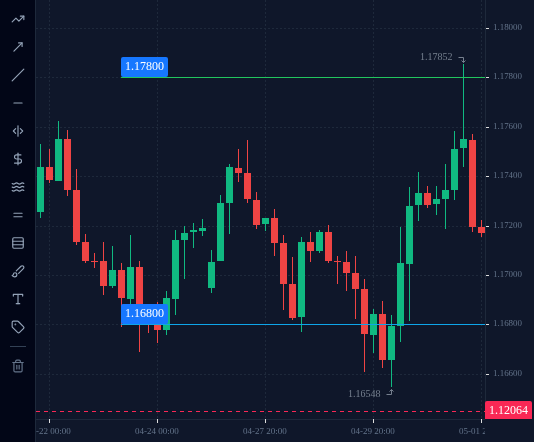
Filled on 23 April, when price first dipped past the entry in the 10:00 hour (low
1.16796). It went as deep as 1.16548 on 30 April in the 04:00 hour, 25 pips past the
entry and 15 pips short of the stop. Take-profit reached on 1 May in the 14:00 hour
(high 1.17852).
Placed again, filled on 5 May, when price first dipped past the entry in the 01:00 hour
(low 1.16796). It went as deep as 1.16763 in the 05:00 hour.
Take-profit reached on 6 May in the 10:00 hour (high 1.17966).
Placed a third time, it filled on 14 May and lost. That trade is the first example in
lesson 2.6. Two good outcomes in a row say nothing about the next one.
EURUSD H4 chart from 23 April to 1 May 2026 with the take-profit (1.1780) and the buy limit entry (1.1680): the first fill on 23 April and the take-profit reached on 1 May. The stop (1.1640) is below the visible prices.
Open this in the terminal
↗(opens in a new tab)
5 Place a bounce order in the terminal
The practice ticket places market orders only: it has no buy limit yet. So you do the
limit order’s job in two parts: an alert waits at the zone for you, and you buy when it fires.
In the terminal, on your practice account:
Open EURUSD on D1 and find the nearest support zone below the current price.
Set a price alert (lesson 2.4): Falls below at the top of the zone.
When the alert fires, look at how price is behaving in the zone. If you still want the
trade, open the order ticket.
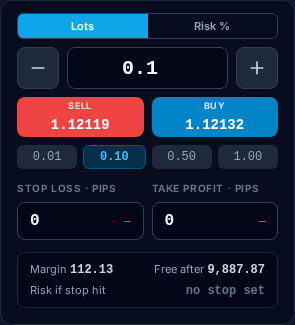
In STOP LOSS · PIPS, type the distance from the current price to a point below the
zone, beyond its deepest wick. In TAKE PROFIT · PIPS, the distance to a little before
the next resistance above.
Switch the size from Lots to Risk % and type 1: the ticket works out the volume so
the stop costs 1% of your equity. Check Risk if stop hit, then press BUY.
The price will be different from the 2026 example. The method is the same. Unlike a buy limit,
your entry is wherever price is when you act, so check the stop distance again before you buy.
The practice terminal's EURUSD order ticket, signed in to a new practice account (staging, prices are the feed at capture time): the Lots | Risk % size toggle, the stop-loss and take-profit fields in pips, SELL and BUY.
Open this in the terminal
↗(opens in a new tab)
Check your understanding
0 of 4 questions right. Answer them all to complete the lesson.