A trading journal records every trade with its setup, reason, screenshot, result and how you felt. It is the only honest record of whether you followed your plan and whether the plan works.
In this lesson you learn what goes into a trading journal, see a full entry for a real EURUSD trade,
and learn to spot an entry that is too thin to learn from.
1 Memory is not a record
After a week of trading most people remember the big win and the painful loss, and very little
in between. That is not enough to judge a plan.
A journal is a written record of every trade, written at the time. It answers two separate
questions:
Did I follow my plan?
Does my plan work?
You cannot answer the second until the first is “yes” for enough trades.
2 The five things every entry needs
Write these for every trade, winners and losers alike:
Setup. Pair, timeframe, date and time, and which setup from your plan this is.
Reason. Why you entered, in one or two sentences, with the entry, stop and target prices.
Screenshot. The chart at entry, and again at exit, with your levels drawn on it.
Result. Pips, money and R (the result divided by what you risked, lesson 11.3).
Emotion. How you felt before and during the trade, and whether you followed the plan.
The emotion line is not decoration. If your rule breaks keep happening after you felt rushed or
annoyed, the journal is the only place you will see it.
Quick check
3 A full entry, on a real chart
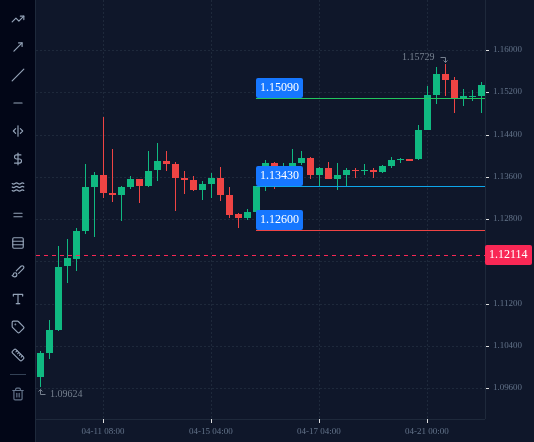
Here is the EURUSD trade from lesson 1.5, written up as a journal entry.
Setup: EURUSD, H4, 16 April 2025, entry at the close of the 00:00 UTC candle. Bounce from
the area of the 15 April low.
Reason: Buy at 1.1343. Stop at 1.1260, just under the 15 April low (1.12639).
Target 1.1509, 1:2. Risk 1% of the account.
Screenshot: chart at entry with the three lines drawn; chart at exit.
Result: the 21 April 00:00 UTC H4 candle reached 1.1509 (its high was 1.15319). Target
hit: 1.1509 − 1.1343 = +166 pips. Risk was 83 pips, so +2R.
Emotion: “Nervous on 17 April when price dipped to 1.1335. Wanted to close early. Did not;
followed the plan.”
Notice that the entry records a moment the trader nearly broke a rule. That is useful
information, even though the trade won.
After a practice trade closes, open the history panel in the web terminal. It lists your closed
trades with their prices and results. Copy the numbers into your journal straight away, then add
what the history cannot know: your reason, your screenshots and how you felt.
A spreadsheet, a notebook or a document all work. What matters is that every trade goes in,
including the ones you would rather forget.