A stop-loss closes a trade at a price you chose in advance to cap the loss. A take-profit closes it at a price you chose to bank the gain. You decide the stop before you enter.
In this lesson you learn what stop-loss and take-profit orders do, where a stop belongs, and why
you choose it before you press the button.
1 What the two orders do
A stop-loss (SL) is an instruction to close your trade automatically if the price reaches a
level you set. It caps how much the trade can lose.
A take-profit (TP) is an instruction to close your trade automatically if the price reaches a
level where you want to take the gain.
On a buy, the stop sits below your entry and the take-profit sits above it.
On a sell, the stop sits above your entry and the take-profit sits below it.
Both work while you are away from the screen.
Quick check
2 Where a stop belongs
A stop goes at the price where your reason for the trade is proven wrong, not at a random
number of pips.
If you buy because price bounced off a recent low, the idea is wrong if price breaks below that
low. So the stop goes a little beyond it, with some room for normal noise.
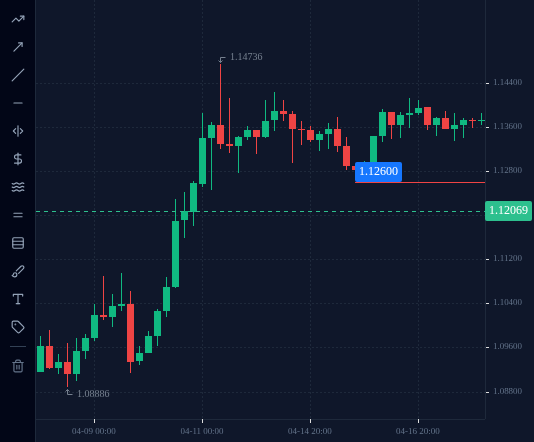
Example: on EURUSD H4, the lowest point of 15 April 2025 was 1.12639 (the 16:00 UTC candle). A
buyer leaning on that low might put the stop at 1.1260, just under it.
On the EURUSD H4 chart, draw a horizontal line at the lowest point of 15 April 2025, the swing low a buyer would put a stop just beneath.
EURUSD, H4, up to 2025-04-15 (UTC).
Press or tap on the chart and drag to place a horizontal line; draw 1 line, then press Check. Keyboard: focus the chart, then arrow keys move the crosshair (Shift for bigger price steps), Enter picks, Backspace removes the last line.
Loading chart…
3 Decide the stop before you enter
Once a trade is open and losing, it is very hard to think clearly. Many traders move their stop
further away “to give it room”, and a small loss becomes a large one.
So the stop is decided before you enter:
Find the price that would prove the idea wrong.
Measure the distance from your entry to that price in pips.
Size the trade so that distance costs only a small part of the account (lessons 1.3 and 1.4).
If you cannot say where the stop goes, you do not have a trade yet.
One honest limit: in a very fast market a stop can be filled at a worse price than you set. This
is called slippage. A stop limits the loss; it does not guarantee the exact price.
Quick check
4 Set them in the terminal
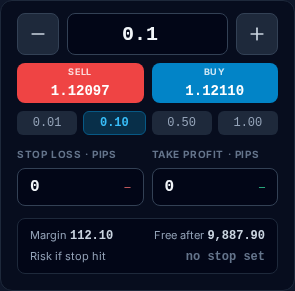
Open the order ticket in the practice terminal on EURUSD. Fill in the volume (Lots), then the
stop-loss and take-profit fields before you send the order. On this ticket both are distances in
pips (STOP LOSS · PIPS, TAKE PROFIT · PIPS), and the ticket shows the price each one works out
to for a buy. The button you press decides the side: a buy puts the stop below the entry, a sell
puts it above.
After the trade is open, the stop and target appear as SL and TP lines on the chart. To move them,
use the SL/TP button on the trade’s row in the Positions list. Moving a target is a choice; moving
a stop further away from your entry is the habit this lesson warns you against.
The practice terminal's EURUSD order ticket, signed in to a new practice account (staging, 16 Oct 2026; prices are the feed at capture time): STOP LOSS · PIPS and TAKE PROFIT · PIPS fields, both still at 0, under the SELL and BUY buttons.
Open this in the terminal
↗(opens in a new tab)
Check your understanding
0 of 4 questions right. Answer them all to complete the lesson.