Open and close one tiny trade with practice money, so you know what a market order, a pending order and a closed trade look like before you study risk.
In this lesson you place your first trade in the practice terminal, a 0.01-lot buy on EURUSD, close
it, and find it in your trade history.
1 Market orders and pending orders
A market order is filled straight away at the current price: a buy at the ask, a sell
at the bid (lesson 0.2).
A pending order waits until the price reaches a level you set:
Buy limit: buy at a price below the current one.
Sell limit: sell at a price above the current one.
Buy stop: buy at a price above the current one.
Sell stop: sell at a price below the current one.
A limit order asks for a better price than now; a stop order waits for the price to move
through a level first. If the price never reaches your level, the order is never filled.
Quick check
2 Buy or sell, and how a trade ends
Buy if your view is that the price will rise; sell if your view is that it will
fall. Selling first is normal in forex: you do not need to own the currency.
A trade stays open until it is closed. Closing does the opposite of the opening order:
a buy is closed by selling at the bid, a sell by buying at the ask. Only then does the
profit or loss move from equity into your balance (lesson 0.5).
A trade can also be closed for you, by a stop-loss or take-profit level you set, or by a
stop out. Module 1 is about setting a stop-loss on every trade. This first trade is only
about the buttons.
Quick check
3 What this trade will cost
You will use 0.01 lot of EUR/USD, one micro lot. One pip is worth US$0.10
(lesson 0.4), so a 1.2-pip spread costs about 1.2 × US$0.10 = US$0.12 the moment it opens.
Expect the trade to show a small loss straight away. That is the spread, not a mistake.
This is the practice account: the money is not real, but treat it as if it were. Habits
formed here come with you.
4 In the terminal: place and close a 0.01-lot buy
Open the order ticket for EURUSD. The practice ticket sends market orders.
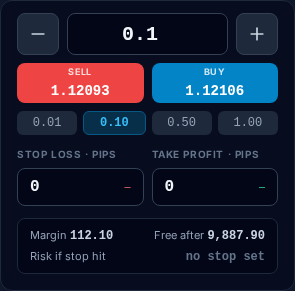
Set the volume (the Lots field) to 0.01. The picture shows it at 0.1; change that to 0.01 before you trade.
Place a buy with the BUY button, which shows the ask. Note the price you were filled
at and compare it with the ask.
Watch the open trade in the Positions list for a minute. Its profit or loss moves with the bid.
Close the trade with the × on its row.
Then look at the account panel: the balance has changed by the result of the trade.
The practice terminal's EURUSD order ticket, signed in to a new practice account (staging, 16 Oct 2026; prices are the feed at capture time): the Lots field at 0.1 with quick buttons 0.01, 0.10, 0.50 and 1.00, SELL showing the bid and BUY showing the ask.
Open this in the terminal
↗(opens in a new tab)
Quick check
5 In the terminal: find it in History
Open the History panel. Your closed trade is listed with its symbol, side (buy), volume
(0.01), open price, close price and result.
Work out the result yourself: close price minus open price, in pips, times US$0.10. It
should match the History line. Every trade you ever take leaves a record here, and Module 11
shows you how to use it as a trading journal.